Many SFI agreement holders ask questions like “what is a rotational actions declaration?”, “when do I need to submit it?”, and “how do I plan where to move my rotational actions?”. These are key searches that show farmers want clear, practical answers as well as tools that help manage the real world admin. Below we answer those questions and explain how JustFarm’s Rotational Action Manager helps you stay compliant and organised.
What is a rotational actions declaration?
Answer:
Some Sustainable Farming Incentive (SFI) actions are rotational actions. That means once you have done them in the first year of your SFI agreement, you can choose to either:
- keep them in the same place
- move them to a different eligible land parcel
- change the area of land entered into that action (subject to the rules that apply to your agreement) GOV.UK+1
If your SFI agreement includes one of these rotational SFI actions, you must complete a rotational actions declaration in the Rural Payments service towards the end of the first and second years of your agreement. You must do this even if you do not want to change the location or area of your rotational actions. The RPA will not pay the instalment for the next agreement year until you have submitted this declaration. GOV.UK+1
How JustFarm helps:
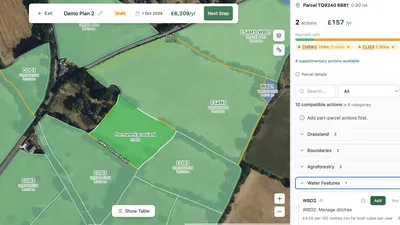
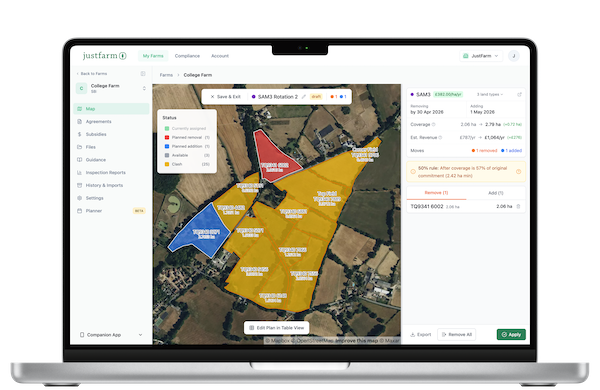
The Rotational Action Manager tool in JustFarm shows exactly where each rotational action currently is on your farm with colour-coded mapping. You can instantly see:
- which actions are rotational
- where they are now
- what land parcels they are on
- any potential issues or restrictions before you make changes
When do I need to complete my rotational actions declaration?
Answer:
You normally complete a rotational actions declaration:
- towards the end of the first year of the action’s duration
- towards the end of the second year of a three-year action
- repeat in later years if an action lasts longer (for example cattle grazing supplement actions lasting five years) GOV.UK
The declaration becomes available in the Rural Payments Service once you have completed your annual declaration. You should submit your rotational actions declaration as soon as it is available, even if you’re not changing anything; otherwise your payment for the next agreement year cannot be released. GOV.UK
How JustFarm helps:
With JustFarm you get reminders when a rotational actions declaration is due. The dashboard flags upcoming declaration windows based on your agreement start dates and action durations, so nothing slips through the cracks.
What rules must I follow when moving a rotational action?
Answer:
When you select a new parcel for a rotational action, the land use must be compatible with the registered land cover on your digital maps in the Rural Payments service. For example, you cannot place an action that needs permanent grassland onto land that is mapped as arable until the land cover and land use are corrected and compatible with the requirements. GOV.UK
If the land use and land cover do not match, the system will show a land use error, which you must fix before you can move that action. You may need to update the land use codes or correct the mapping. GOV.UK
How JustFarm helps:
JustFarm’s mapping engine shows land cover vs land use at parcel level, so you can instantly see where a rotational action can and cannot be moved. Colour coding highlights clashes, and explanatory tooltips tell you why an action is incompatible with a parcel before you attempt the move.
Can I change the area of a rotational action?
Answer:
Yes. The SFI scheme allows you to increase, decrease or leave unchanged the area you have entered into rotational actions after the first year, subject to the specific rules of the action. Some offers or restricted agreements may limit the ability to increase area beyond what was first declared. GOV.UK
For example, if a rotational action started on 10 hectares, you may reduce it to 5 hectares for the next year and keep it there if you want. As long as the area remains within rules and connected to eligible land, you can plan as needed. GOV.UK Assets
How JustFarm helps:
JustFarm shows you the coverage change and estimated revenue change when you plan to move, increase, or decrease the area of a rotational action. The planning interface calculates these impacts in real time so you can make informed choices.
How do I tell the RPA about changes?
Answer:
Once the rotational actions declaration is open for your agreement year:
- sign in to Rural Payments service
- go to your SFI agreement
- select Rotational Actions Declaration
- either report changes to location/area or confirm that no changes are being made
- submit the declaration before the deadline to avoid delays in payment GOV.UK
How JustFarm helps:
JustFarm prepares a compliance record ready for export or upload to the Rural Payments service. Once you’ve planned your changes in the Rotational Action Manager, you can export the updated map views and parcel information that match what the RPA expects.
What happens if land use or land cover is wrong?
Answer:
If the land use and registered digital land cover do not match when you attempt to add a rotational action, you will receive a land use error message. You need to correct either the declared land use or the land cover on your Parcel maps before proceeding. GOV.UK
Common error messages include:
- No land use declared for the parcel
- Not all of the parcel is covered by a land use
- Land use is not compatible with the existing land cover GOV.UK
How JustFarm helps:
JustFarm allows you to correct and synchronise land use and land cover with ease. You can update parcel records, align land cover, and confirm compatibility before you plan or apply rotational action moves.
How to plan rotational action moves without mistakes
Answer:
Good planning for rotational actions means:
- reviewing your existing placements
- checking the eligibility and size of parcels
- ensuring land use and land cover are correct
- calculating impacts of moving actions on area and payment levels
- avoiding conflicting actions in the same parcel that are incompatible with rotational moves GOV.UK
How JustFarm helps:
The Rotational Action Manager shows you a colour-coded map or a table view with the same data. You can visually assess your options, select parcels to remove actions, add to new parcels, and immediately see the consequences in terms of coverage and estimated value. This means no guesswork and no last-minute surprises.
What if I don’t move a rotational action?
Answer:
Even if you are not planning to move a rotational action, you must still complete the rotational actions declaration when it is available. This confirms to the RPA that your locations and areas remain the same for the next year. If you fail to submit the declaration, your payment may be delayed. GOV.UK
How JustFarm helps:
JustFarm tracks your declaration windows and lets you confirm “no change” quickly so that confirming stability is just as easy as updating the plan.
Questions farmers search around rotational actions
What is a rotational SFI action?
Rotational SFI actions are those you can move around your land each year of the action’s duration after the first year. GOV.UK
How JustFarm helps: Shows where you can move them on the map with compatibility indicators.
When is my rotational actions declaration due?
Usually towards the end of the first and second years for three-year actions. GOV.UK
How JustFarm helps: Sends alerts and reminders when the declaration window opens.
Can I plan future moves for rotational actions?
Yes, within the rules for that action in your agreement. GOV.UK
How JustFarm helps: Lets you plan hypothetical moves and compare coverage/revenue before applying.
What if the parcel’s land use is wrong?
You must correct land use before placing the action. GOV.UK
How JustFarm helps: Shows mismatches in land use/cover and guides correction.
If tracking and planning rotational actions feels complex, the JustFarm Rotational Action Manager tool is built to take the pain out of the process. It helps you map, plan, calculate impacts, resolve land use clashes, and prepare declaration-ready records quickly and confidently. Start using the Rotational Action Manager today and make your next rotational actions declaration simple, clear, and compliant.