Farmers and land agents have told us that managing SFI rotational actions is one of the hardest parts of keeping agreements compliant. Questions like “where are my rotational actions?”, “can I move them to new parcels?”, “how much area have I used?”, and “what happens to my payment?” come up again and again. These problems are real, and they come down to mapping, planning, tracking and paperwork.
Rotational SFI actions give flexibility, but they also create one of the most confusing admin jobs in farming. Most farmers and land agents we speak to struggle to see where rotational actions currently sit, plan where they should move next, and check whether proposed changes are eligible. That confusion grows as the rotational actions declaration window approaches.
This is exactly why we built the new JustFarm Rotational Action Manager. It brings a clear, visual, planning ready workflow that removes the paperwork and risk from rotational actions, so you can plan confidently and stay compliant.
JustFarm’s Rotational Action Manager: the simple solution
Our new tool gives farmers and land agents a clear way to track, plan and manage rotational SFI actions across the whole farm.
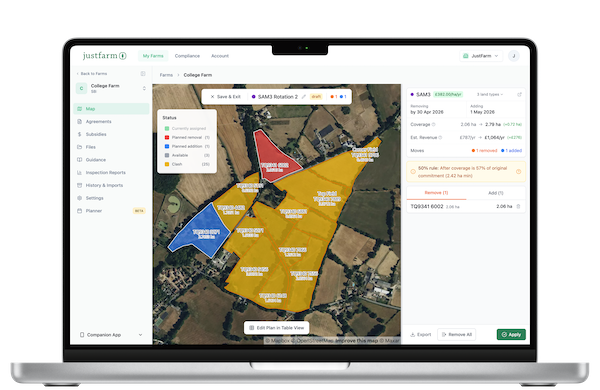
A visual map showing rotational actions across your land
Your farm map shows every parcel with rotational actions colour coordinated. You see instantly:
- where each action is
- which parcels are eligible for receiving the action
- how much coverage is already in place
This removes the guesswork that normally comes from juggling spreadsheets or paper maps.
Easy planning for moving actions
Click on any parcel to:
- remove an action and record the removal date
- see the coverage and how many times the action has already moved
- add that action to a new parcel and choose the coverage you want
Every decision is logged, dated and attached to the right parcel for compliance.
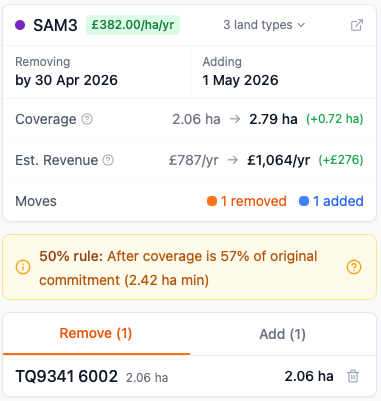
Coverage and revenue impact calculations
The tool instantly calculates:
- the change in total action area
- whether that coverage meets the rules
- estimated revenue changes if you are increasing or decreasing area
Farmers can see the financial and compliance impact before committing.
Compatibility warnings that stop errors early
If a parcel cannot take the action, you will see a clear warning. For example:
- incompatible land cover
- incompatible land use
- another conflicting action already claiming the parcel
- area limitations for your offer
This prevents the common mistakes that usually only appear during the RPA declaration process.
Map or table view
Use whichever suits you:
- a map view showing actions visually
- a table view listing every parcel, action, area and warning
Both contain identical compliance checks.
Apply your plan and generate evidence
When you are happy with your rotation plan:
- apply it in one click
- generate a compliance record
- prepare the details you will need for the rotational actions declaration in Rural Payments
This keeps your declaration simple, accurate and ready on time.
The challenges farmers and land agents face with rotational actions
Farmers and advisers regularly tell us that rotational actions are one of the most confusing parts of SFI guidance. Based on GOV.UK guidance and farmer feedback, the main problems are clear.
Hard to see where rotational actions are placed
Rotational actions move year to year, so it becomes difficult to track:
- which parcels currently hold the action
- how much area is assigned
- when actions were last moved
Without a visual tool, it quickly becomes complicated.
How JustFarm helps
The colour coordinated map shows every action by parcel and by coverage, so you never need to cross check multiple sources again.
Understanding the SFI rotational actions declaration
Farmers must complete a rotational actions declaration in the Rural Payments service near the end of the first and second years. You must do this even if you are making no changes. Failure to submit the declaration means your next year’s payment will be withheld.
How JustFarm helps
The system builds the declaration information for you by recording action locations, coverage and moves throughout the year.
Checking which parcels are compatible
Many farmers struggle to know:
- which parcels can legally take a moved action
- whether land use or land cover matches SFI rules
- whether actions clash with other actions on the same land
- whether moving the action breaks the area limits in their agreement
How JustFarm helps
JustFarm warns you instantly when a parcel is incompatible and explains the reason so you do not waste time trying to make it fit.
Calculating area and payment changes
The biggest pain point is calculating how a move affects:
- total action area
- allowed coverage
- estimated revenue for the next year
How JustFarm helps
As soon as you select a parcel, the tool calculates all area and revenue changes in real time.
Preparing for the declaration window
Most farmers scramble to prepare their rotational data when the declaration window opens.
How JustFarm helps
The Rotational Action Manager keeps everything updated, logged and ready. When the window opens, you already know exactly what you will declare.
FAQs
What is an SFI rotational action?
A rotational action is an SFI action that can be moved to different eligible parcels after the first year of your agreement. You can:
- keep it where it is
- move it to a new parcel
- change the area covered, within the rules
How JustFarm helps
The tool tracks where each action is now and gives you a simple process for planning where it should move next.
When do I need to submit the rotational actions declaration?
You must submit the declaration:
- near the end of your first year
- again near the end of your second year
This applies even if you are not changing anything.
How JustFarm helps
JustFarm prepares every detail you need, including locations, dates, coverage and move history.
Can I move rotational actions to any parcel?
No. Parcels must be eligible and must not clash with other actions. You must also follow the rules on land use, land cover and area.
How JustFarm helps
JustFarm checks compatibility automatically and warns you if a parcel cannot take the action.
What information do I need before making my declaration?
You need:
- the parcel the action will be on
- the coverage area
- the date the action was added or moved
- whether you removed the action from another parcel
- a record of changes across the year
How JustFarm helps
The Rotational Action Manager builds this record for you automatically.
What to do next
- Log in to JustFarm
- Open the Rotational Action Manager
- Review your current actions
- Plan your moves early
- Check any compatibility or coverage warnings
- Apply your new rotation when ready
Rotational actions do not need to be confusing. With JustFarm’s new Rotational Action Manager you get a clear, visual, fully compliant way to track, plan and move your SFI actions. Start today and remove the uncertainty before the next declaration window arrives.